How to nudge clips
Nudging shifts a clip's start and end times so the video matches its line perfectly. It takes special account privileges — email us at support@visdom.io if you would like access to nudging the starts and ends of clips.
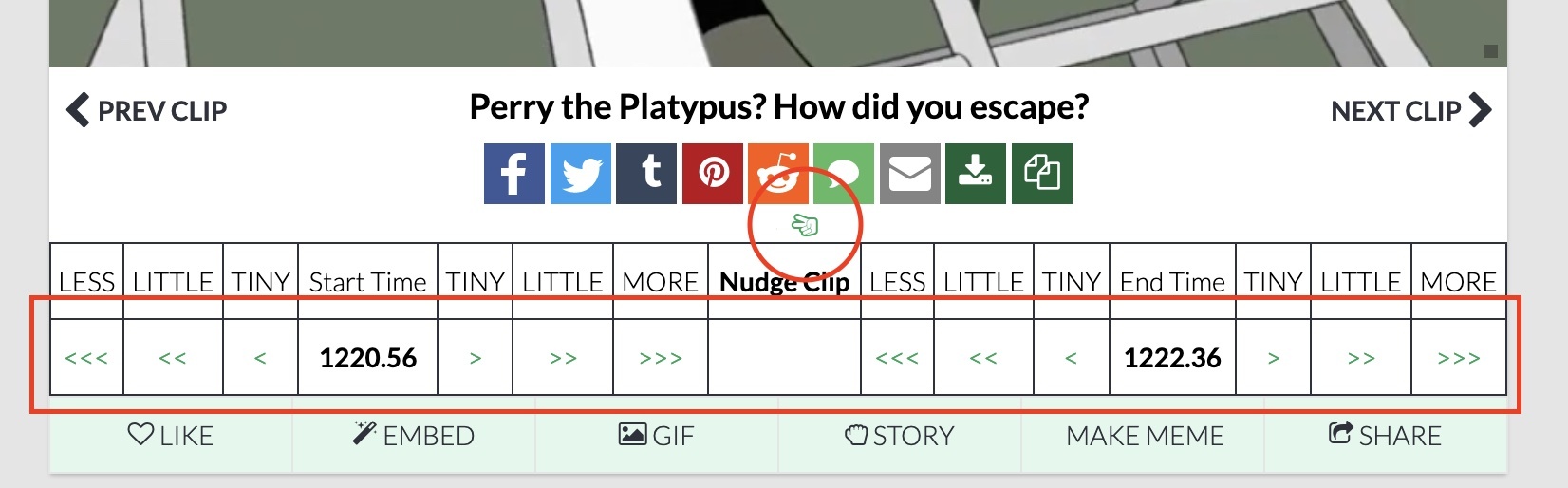
The alligator hand
If you do not see the Alligator Hand on a clip, try to logout and login and make sure you see the little icon as indicated in the image above — it might be under the share links and not next to the text. When you log in, you'll see the alligator hand on any clip: click it to bring up the nudge menu.
The guideline
Our main request is asking folks to try to keep the audio matching the transcript of the clip. The clips are intentionally short to make them quick to find and put into conversation.
Nudge the start or end
You can nudge "start time" and "end time" in or out (+/-), by clicking on the little arrows (e.g. "<<<" or "<<" or "<" or ">" or ">>" or ">>>"). The nudges are in 0.05, 0.1, and 0.3 seconds. You can nudge a clip multiple times if necessary. It is useful sometimes to try a small nudge to get it 'perfect'… and move it back if it's too much. It might take like 10-15 seconds to do one nudge, so be patient.
Extra-tiny nudges
If you want really fine-tuned nudges, the 'TINY' word in the table header row links to 0.01, and 'LITTLE' is 0.02. Those are superuser level nudges, since most people do not need that very fine-grained nudging.